What Happens If You Disable Your Discord Account
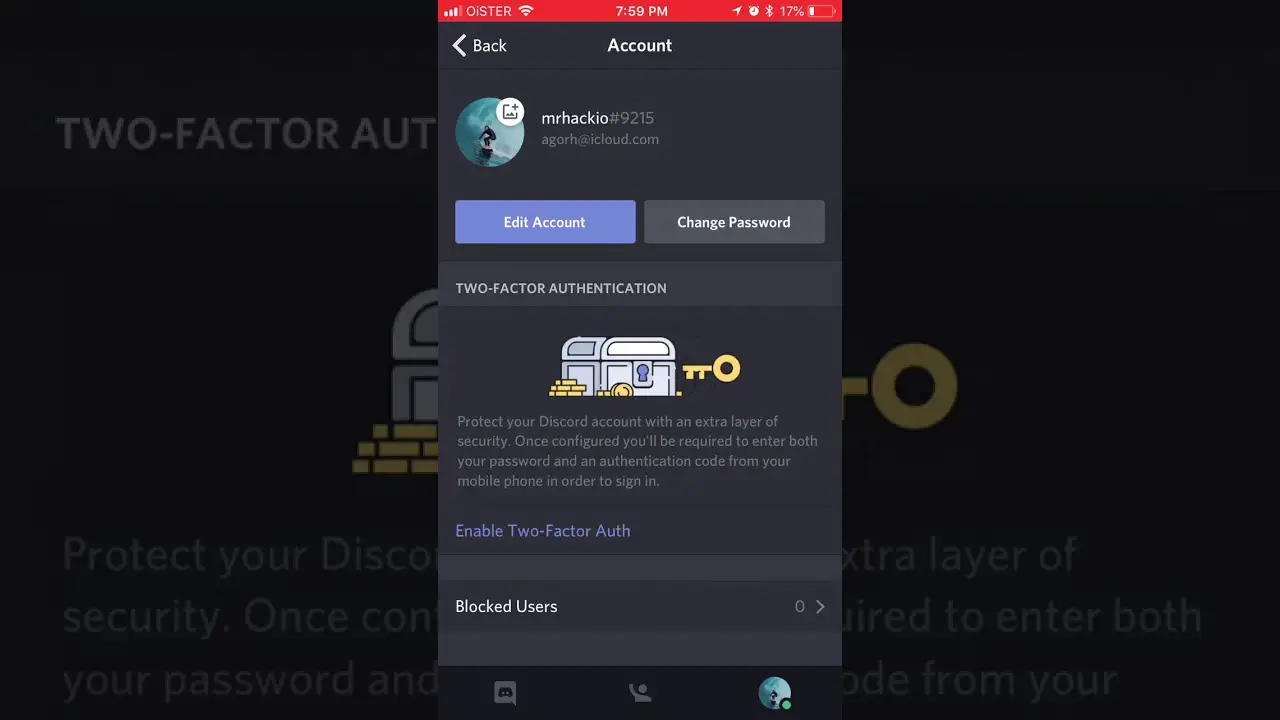
Disabling your Discord account puts it on hold, and you can reactivate it by logging in and following the prompts. However, you will no longer receive any email notifications associated with your Discord account.
Your username will be removed from all joined servers, and the associated data will be temporarily deleted.
How To Disable Your Discord Account
Disabling your Discord account puts it on hold, meaning you won’t receive any email notifications, but you can still receive friend requests. Your username will be removed from all joined servers temporarily, but you can reactivate your account at any time.
Deleting your account, on the other hand, permanently removes it from Discord.
Hen it comes to disabling your Discord account, it’s important to understand the implications and what it means for your account. This article will guide you through the steps to disable your Discord account and provide insights on what happens when you choose to do so.
Steps To Disable Your Discord Account:
Disabling your account on Discord is a straightforward process. Follow the steps below to disable your account:
- Open the Discord application or visit the Discord website.
- Log in with your account credentials.
- Click on the gear icon in the bottom left corner to access User Settings.
- From the options on the left side of the screen, select “My Account.”
- Scroll down and click on the “Disable Account” option.
- Discord will prompt you to confirm the decision. Read the information carefully before proceeding.
- Once you have reviewed the details, click on the “Disable Account” button to confirm.
What Happens When You Disable Your Discord Account:
Disabling your Discord account comes with a few consequences. Here’s what you can expect when you disable your account:
- Account On Hold: Disabling your account puts it on hold, meaning you won’t be able to log in or access any of the Discord features.
- No Email Notifications: When you disable your account, you will no longer receive any @notifications through the email address associated with your Discord account. This includes notifications for messages, mentions, or server activity.
- Limited Access: While your account is disabled, you won’t be able to participate in any servers, communicate with other Discord users, or access any of your messages or conversations.
- Friend Requests: Despite disabling your account, you can still receive friend requests from other Discord users. However, you won’t be able to interact with them until you reactivate your account.
- Reactivation Option: The good news is that disabling your account doesn’t mean it’s gone forever. If you change your mind or decide to come back, you can reactivate your account at any time. Simply log in again and follow the prompts.
It’s important to note that disabling your Discord account is different from deleting it. Disabling allows you to preserve your account and reactivate it in the future, while deleting permanently removes your account and all associated data.
Now that you know the steps to disable your Discord account and what happens when you do so, you can make an informed decision based on your needs and preferences. Remember, if you choose to disable your account, you can always come back whenever you’re ready.
What Does It Mean To Disable Your Discord Account?
Disabling your Discord account means putting it on hold, where you won’t receive email notifications but can still receive friend requests. Your username will be removed from joined servers and associated data will be temporarily deleted, but you can reactivate the account if desired.
Understanding The Concept Of Disabling A Discord Account:
When you disable your Discord account, it means that your account is temporarily put on hold. This means you won’t be able to access your account or receive any notifications via the email address linked to your account. However, you can still receive friend requests.
Disabling your account is different from deleting it, as you have the option to reactivate it later if you change your mind.
What Happens When You Disable Your Discord Account?
When you disable your Discord account, several things occur:
- Your account is put on hold, preventing you from accessing it.
- You no longer receive any @notifications through the email address associated with your account.
- Your account settings and information are preserved, meaning that when you reactivate your account, everything will be as you left it.
- Your friends can still view your profile, but they won’t be able to directly contact you or send messages.
- You will still appear on your friends’ friend lists, but your status will show as “disabled.”
How Disabling Affects Your Account Settings And Information:
Disabling your Discord account doesn’t delete any of your account settings or information. When you decide to reactivate your account, everything will be just as you left it. This includes your server memberships, chat history, and other account preferences.
Please note that while disabling your Discord account protects your account from any unwanted activity or access, it doesn’t remove your personal data from Discord’s servers. If you want to completely delete your account and all associated data, you’ll need to go through the account deletion process instead.
Overall, disabling your Discord account provides a temporary break from the platform while allowing you to return and continue where you left off without losing any settings or information.
Is A Disabled Discord Account Permanent?
Disabling your Discord account puts it on hold, meaning you won’t receive any email notifications or messages. However, you can still reactivate your account and receive friend requests. It’s important to note that a disabled account is only temporary, while a deleted account is permanently removed.
Discussing The Permanency Of A Disabled Discord Account:
When it comes to disabling your Discord account, one common concern is whether or not it is permanent. Let’s delve into the topic and answer the question: Is a disabled Discord account permanent?
- Disabling your account: When you disable your Discord account, it means your account is put on hold. You will no longer receive any @notifications through the email address associated with your Discord account. However, you can still receive friend requests.
- Recovering a disabled Discord account: The good news is that a disabled Discord account is not permanent. If you change your mind or decide you want to use Discord again, you have the option to reactivate your account. Simply log in and follow the prompts to reactivate your account.
To summarize:
- Disabling your Discord account does not mean it is permanently deleted.
- You will no longer receive @notifications to your email address, but friend requests are still possible.
- If you decide to use Discord again, you can easily reactivate your account by logging in.
So, if you ever disable your Discord account and have a change of heart, rest assured that you can recover it without any hassle.
Can You Reactivate A Disabled Discord Account?
Disabling your Discord account means it is temporarily put on hold. You can reactivate it by logging in and following the prompts. However, when your account is disabled, you will no longer receive email notifications associated with your account, but you can still receive friend requests.
Exploring The Possibility Of Reactivating A Disabled Account:
When you disable your Discord account, it is temporarily put on hold, allowing you the option to reactivate it in the future. This means that even though your account is disabled, you can recover it at any time. However, it’s important to note that disabling your account is different from permanently deleting it.
Disabling gives you the flexibility to reactivate your account whenever you choose, while deletion is a permanent action with no option for recovery. So, if you disable your Discord account, you can explore the possibility of reactivating it whenever you’re ready.
Steps To Reactivate A Disabled Discord Account:
To reactivate your disabled Discord account, you need to follow these simple steps:
- Log in to Discord: Go to the Discord website or open the Discord application and log in using your account credentials.
- Navigate to the Account Settings: Once you’re logged in, click on the gear icon located at the bottom left corner of the Discord interface. This will open the User Settings menu.
- Access the My Account tab: In the User Settings menu, find and click on the “My Account” tab. This will take you to the account settings page.
- Reactivate your account: Scroll down the account settings page until you find the section labeled “Account Management.” Under this section, you’ll see a button that says “Reactivate Account.” Click on this button to initiate the reactivation process.
- Confirmation email: After clicking on the “Reactivate Account” button, Discord will send a confirmation email to the email address associated with your account. Open the email and follow the instructions provided to confirm the reactivation.
- Account reactivation: Once you’ve confirmed the reactivation, your Discord account will be restored and ready to use again. You will regain access to all your previous messages, friends, servers, and settings.
By following these steps, you can easily reactivate your disabled Discord account and continue using Discord as before. Remember that reactivation is only possible if you have previously disabled your account rather than permanently deleted it.

Similar Posts